
Multimedia Networking
Multimedia Networking Applications:
We define a multimedia network application as any network application that employs audio or video.
Properties of Video:
- High Bit Rate: Video distributed over the internet typically ranges form 100kbps to 3Mbps. Thus, when designing networked video applications, the first thing we must keep in mind is the high bit rate.
- Video Compression: There are two types of redundancy in video, both of which can be exploited for video compression.
- Spatial Redundancy: is the redundancy within a given image
- Temporal Redundancy: reflects the repetitions from image to a subsequent image.
Properties of Audio:
Types of Multimedia Network Applications:
Streaming Stored Audio and Video:
The underlying media is prerecorded. these prerecorded medias are placed on servers and users send requests to the servers to view them. Streaming stored media has three key distinguishing features:
- Streaming: the client will be playing out from one location in the media while at the same time receiving later parts of the media from the server. This technique is called streaming and avoids having to download the entire media file.
- Interactivity: As media is prerecorded it allows users to pause, seek, fast-forward etc.
- Continuous Playout: Once the playout begins, it should proceed according to the original timing of recording.
The most important performance measure for streaming media is average throughput. By using buffering and prefetching, it is possible to provide continuous playout even when the throughput fluctuates, as long as the average throughput remains above the media rate.
Conversational Voice and Video-over-IP:
Conversational multimedia applications are delay-sensitive and loss-tolerant.
Streaming Live Audio and Video:
These applications allow a user to receive a live radio or television transmission. Live, broadcast-like applications often have many users who receive the same audio/video program at the same time. The techniques used for streaming live media—initial buffering delay, adaptive bandwidth use, and CDN distribution—are similar to those for streaming stored media.
Streaming Stored Video:
Streaming video systems can be classified into three categories:
- UDP Streaming
- HTTP Streaming
- adaptive HTTP Streaming
A common characteristic of all three forms of video streaming is the extensive use of client-side application buffering to mitigate the effects of varying end-to-end delays and varying amounts of available bandwidth between server and client.
There are two important advantages provided by such client buffering:
- client-side buffering can absorb variations in server-to-client delay.
- Second, if the server-to-client bandwidth briefly drops below the video consumption rate, a user can continue to enjoy continuous playback, again as long as the client application buffer does not become completely drained.
UDP Streaming:
With UDP streaming, the server transmits video at a rate that matches the client’s video consumption rate by transmitting the video chunks over UDP at a steady rate.
UDP does not employ a congestion-control mechanism, the server can push packets into the network at the consumption rate of the video without the rate-control restrictions
Before passing the video chunks to UDP, the server will encapsulate the video chunks within transport packets specially designed for transporting audio and video, using the Real-Time Transport Protocol (RTP)
In addition to the server-to-client video stream, the client and server also maintain, in parallel, a separate control connection over which the client sends commands regarding session state changes (such as pause, resume, reposition, and so on)
It suffers from three significant drawbacks.
- First, due to the unpredictable and varying amount of available bandwidth between server and client, constant-rate UDP streaming can fail to provide continuous playout.
- The second drawback of UDP streaming is that it requires a media control server
- The third drawback is that many firewalls are configured to block UDP traffic, preventing the users behind these firewalls from receiving UDP video.
HTTP Streaming:
In HTTP streaming, the video is simply stored in an HTTP server as an ordinary file with a specific URL.
The client establishes a TCP connection with the server and issues an HTTP GET request for that URL. The server then sends the video file, within an HTTP response message as quickly as TCP congestion control and flow control will allow.
On the client side, the bytes are collected in a client application buffer. Once the number of bytes in this buffer exceeds a predetermined threshold, the client application begins playback
Designers of streaming video systems learned that TCP’s congestion control and reliable-data transfer mechanisms do not necessarily preclude continuous playout when client buffering and prefetching are used.
In UDP Streaming the server transmits video at the rate at which the video is to be played. However, for streaming stored video, the client can attempt to download the video at a rate higher than the consumption rate, thereby prefetching video frames that are to be consumed in the future.
Such prefetching occurs naturally with TCP streaming, since TCP’s congestion avoidance mechanism will attempt to use all of the available bandwidth between server and client.
The server send rate can be no higher than the video consumption rate at the client. Therefore, a full client application buffer indirectly imposes a limit on the rate that video can be sent from server to client when streaming over HTTP.
HTTP streaming systems often make use of the HTTP byte-range header in the HTTP GET request message, which specifies the specific range of bytes the client currently wants to retrieve from the desired video.
When the user repositions to a new position, the client sends a new HTTP request, indicating with the byte-range header from which byte in the file should the server send data.
Adaptive Streaming and DASH
HTTP streaming has a major shortcoming: All clients receive the same encoding of the video, despite the large variations in the amount of bandwidth available to a client, both across different clients and also over time for the same client.
This has led to the development of a new type of HTTP-based streaming, often referred to as Dynamic Adaptive Streaming over HTTP (DASH).
In DASH, the video is encoded into several different versions, with each version having a different bit rate and, correspondingly, a different quality level. The client dynamically requests chunks of video segments of a few seconds in length from the different versions.
With DASH, each video version is stored in the HTTP server, each with a different URL. The HTTP server also has a manifest file, which provides a URL for each version along with its bit rate.
The client first requests the manifest file and learns about the various versions. The client then selects one chunk at a time by specifying a URL and a byte range in an HTTP GET request message for each chunk. While down- loading chunks, the client also measures the received bandwidth and runs a rate determination algorithm to select the chunk to request next.
By dynamically monitoring the available bandwidth and client buffer level, and adjusting the transmission rate with version switching, DASH can often achieve continuous playout at the best possible quality level without frame freezing or skipping. Furthermore, since the client (rather than the server) maintains the intelligence to determine which chunk to send next, the scheme also improves server-side scalability
Content Delivery Networks
In order to meet the challenge of distributing massive amounts of video data to users distributed around the world, almost all major video-streaming companies make use of Content Distribution Networks (CDNs).
CDNs typically adopt one of two different server placement philosophies:
- Enter Deep: philosophy pioneered by Akamai, is to enter deep into the access networks of Internet Service Providers, by deploying server clusters in access ISPs all over the world
- Bring Home: A second design philosophy, is to bring the ISPs home by building large clusters at a smaller number (for example, tens) of key locations and connecting these clusters using a private high-speed network. Instead of getting inside the access ISPs, these CDNs typically place each cluster at a location that is simultaneously near the PoPs(Point of Presence) of many tier-1 ISP
CDN Operation:
When a browser in a user’s host is instructed to retrieve a specific video (identified by a URL), the CDN must intercept the request so that it can
- determine a suitable CDN server cluster for that client at that time, and
- redirect the client’s request to a server in that cluster.
Most CDNs take advantage of the DNS to intercept and redirect requests; Consider example
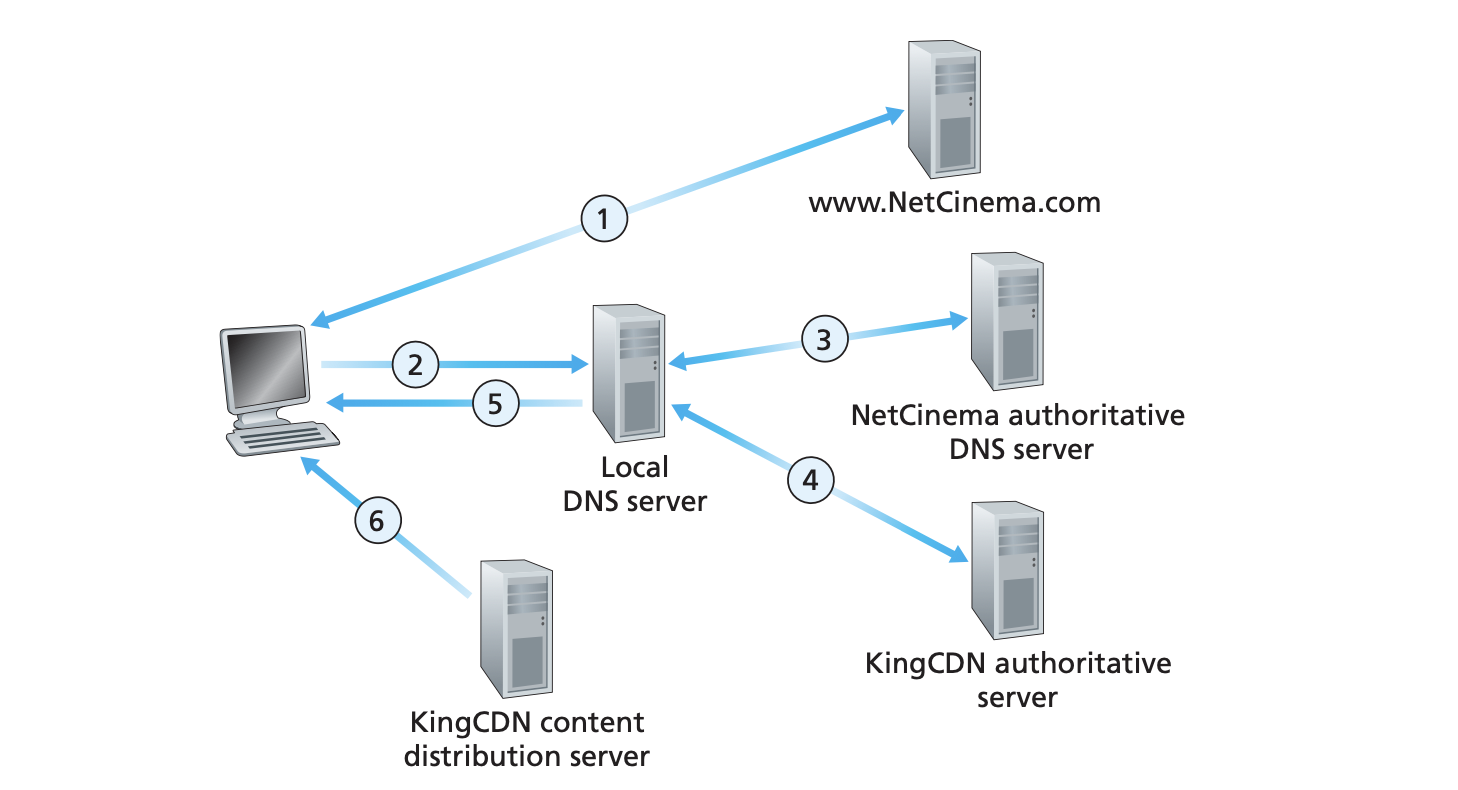
- User visits the website for getting the video
- User sends a DNS request to resolve
videos.server.com - Servers authoritative identifies the hostname and hands it over to the CDN by returning a CNAME record to the CDNs server say
cdn1.server.com - Users DNS now tries to resolve
cdn1.server.comand contacts the CDNs authoritative server - Now the authoritative server responds with the IPAddress of the CDN server closest to the user
- User establishes TCP connection to the server and forwards the request
Cluster Selection Strategies:
At the core of any CDN deployment is a cluster selection strategy, that is, a mechanism for dynamically directing clients to a server cluster or a datacenter within the CDN.
The CDN learns the IP address of the client’s LDNS server via the client’s DNS lookup. After learning this IP address, the CDN needs to select an appropriate cluster based on this IP address.
One simple strategy is to assign the client to the cluster that is geographically closest. Using commercial geo-location databases such as Quova and Max-Mind, each LDNS IP address is mapped to a geographic location.
For some users the solution may perform poorly because:
- the geographically closest cluster may not be the closest cluster along the network path.
- some end-users are configured to use remotely located LDNSs in which case the LDNS location may be far from the client’s location.
- ignores the variation in delay and available bandwidth over time of Internet paths, always assigning the same cluster to a particular client.
In order to determine the best cluster for a client based on the current traffic conditions, CDNs can instead perform periodic real-time measurements of delay and loss performance between their clusters and clients.
An alternative to sending extraneous traffic for measuring path properties is to use the characteristics of recent and ongoing traffic between the clients and CDN servers
Such solutions, however, require redirecting clients to (possibly) suboptimal clusters from time to time in order to measure the properties of paths to these clusters.
Another alternative for cluster-to-client path probing is to use DNS query traffic to measure the delay between clients and clusters. Specifically, during the DNS phase, the client’s LDNS can be occasionally directed to different DNS authoritative servers installed at the various cluster locations, yielding DNS traffic that can then be measured between the LDNS and these cluster locations.
A different approach to matching clients with CDN servers is to use IP anycast. The idea behind IP anycast is to have the routers in the Internet route the client’s packets to the “closest” cluster, as determined by BGP.
Voice-over-IP:
Limitations of Best-Effort IP Service:
The sender generates UDP segments which are assume sent every 20ms. Some packets can be lost and most packets will not have the same end-to-end delay. For this reason, receiver must take more care in determining
- When to play back a chunk
- What to do with a missing chunk
Packet Loss:
Datagrams can be lost due to network congestion. Packet loss are not as disastrous as one might think. Packet loss rates between 1% to 10% are tolerated, depending on how voice is encoded and transmitted and how loss is handled at receiver.
End-to-End delay:
End-to-End delay is the accumulation of transmission, processing and queuing delays in routers; propagation delays in links and processing delays at end-systems For delays:
- <150ms: Not perceived by humans
- 150-400ms: Okay but not ideal
- >400ms: not okay and are considered dropped
Packet Jitter:
Because of varying delays, the time from when a packet is generated at the source until it is received at the receiver can fluctuate from packet to packet. This phenomenon is called jitter. Jitter can often be removed by using sequence numbers, timestamps and playout delay.
Removing Packet Jitter:
The receiver should attempt to provide periodic playout of voice chunks in the presence of random network jitter. Achieved by combining two mechanisms:
- Prepending each chunk with a timestamp.
- Delaying playout of chunks at receiver
Fixed Playout Delay:
With the fixed-delay strategy, the receiver attempts to play out each chunk exactly q ms after the chunk is generated. So if a chunk is timestamped at the sender at time t, the receiver plays out the chunk at time t + q, assuming the chunk has arrived by that time.
What is a good choice for q?
VoIP can support delays up to about 400 ms, although a more satisfying conversational experience is achieved with smaller values of q.
Adaptive Playout Delay:
Ideally, we would like the playout delay to be minimised subject to the constraint that the loss be below a few percent.
The natural way to deal with this trade-off is to estimate the network delay and the variance of the network delay, and to adjust the playout delay accordingly at the beginning of each talk spurt.
the receiver employs the following algorithm for the playout of packets. If packet i is the first packet of a talk spurt, its playout time, pi, is computed as:
- - playout time for the packet
- - time at which the packet was generated
- - average delay calculated
- - variance of the delay
This playout delay is calculated for the first packet received in a talk spurt. for every subsequent packet in the spurt the packet is played with a fix delay of .
How does a receiver detect the first packet of a talk spurt?
- if no loss, if
- if loss, if and no gaps in sequence number
Recovering from packet loss:
We now briefly describe several schemes that attempt to preserve acceptable audio quality in the presence of packet loss. Such schemes are called loss recovery schemes.
VoIP applications often use some type of loss anticipation scheme. Two types of loss anticipation schemes are forward error correction (FEC) and interleaving.
FEC:
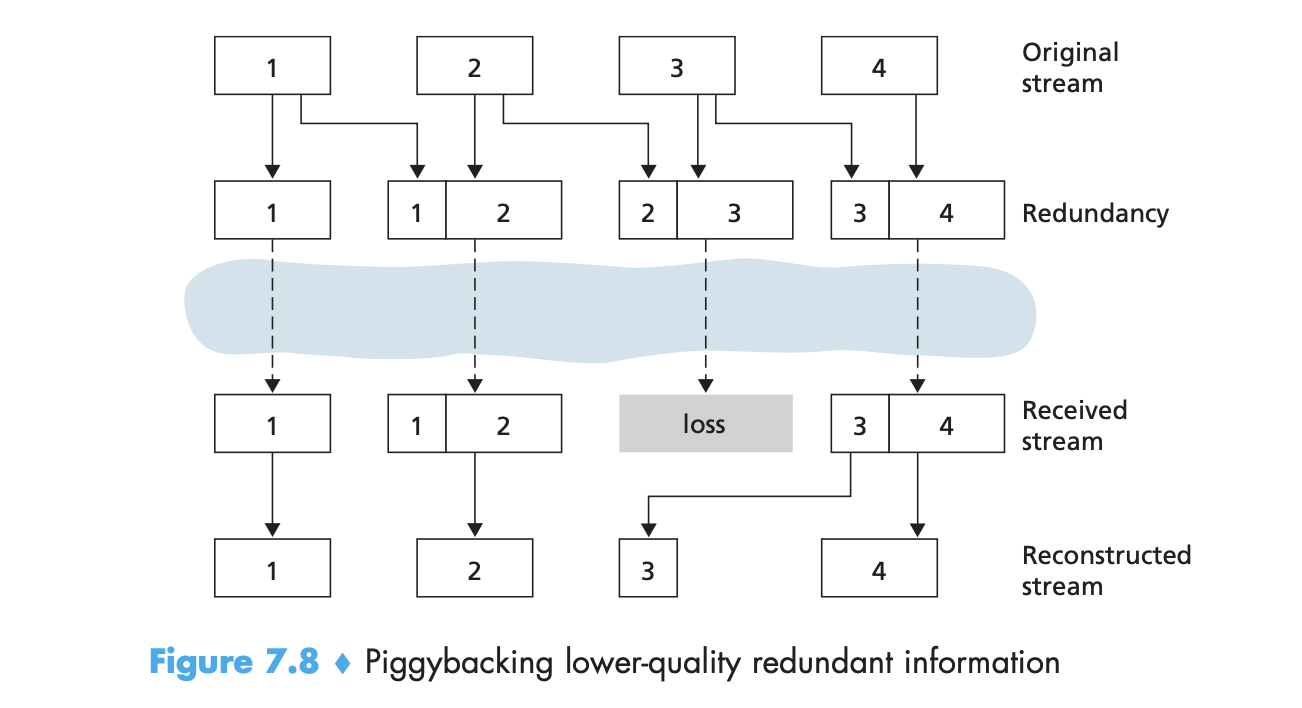 The basic idea of FEC is to add redundant information to the original packet stream. For the cost of marginally increasing the transmission rate, the redundant information can be used to reconstruct approximations or exact versions of some of the lost packets.
The mechanism sends a lower-resolution audio stream as the redundant information. The sender constructs the nth packet by taking the nth chunk from the nominal stream and appending to it the (n – 1)st chunk from the redundant stream. In this manner, whenever there is nonconsecutive packet loss, the receiver can conceal the loss by playing out the low-bit rate encoded chunk that arrives with the subsequent packet.
Interleaving:
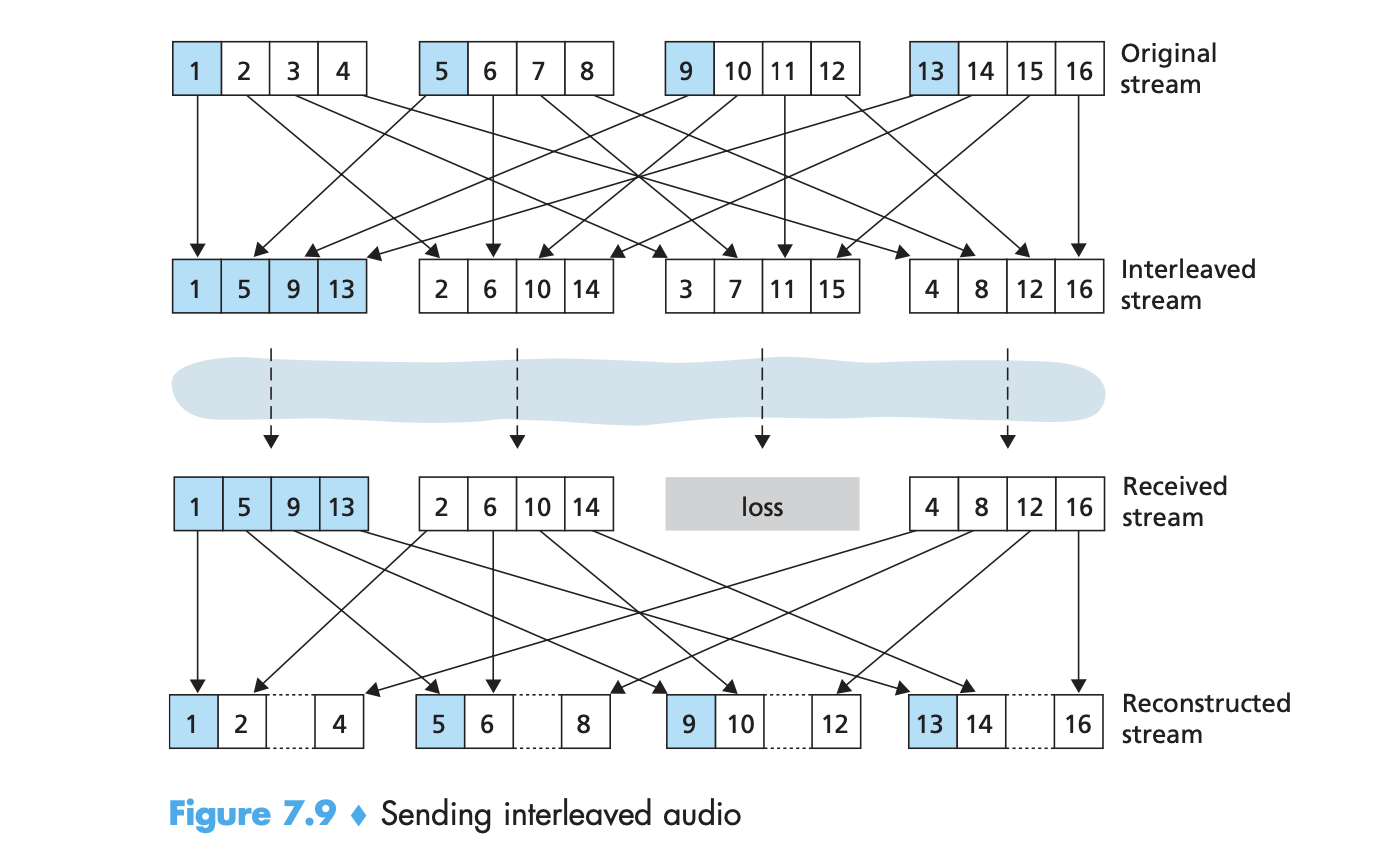 As an alternative to redundant transmission, a VoIP application can send interleaved audio. The sender resequences units of audio data before trans- mission, so that originally adjacent units are separated by a certain distance in the transmitted stream. Interleaving can mitigate the effect of packet losses.
The loss of a single packet from an interleaved stream results in multiple small gaps in the reconstructed stream, as opposed to the single large gap that would occur in a non-interleaved stream. A major advantage of inter- leaving is that it does not increase the bandwidth requirements of a stream.
Error Concealment:
Error concealment schemes attempt to produce a replacement for a lost packet that is similar to the original. This is possible since audio signals, and in particular speech, exhibit large amounts of short-term self-similarity.