
Internet Protocol IP
Internet addressing and forwarding are important components of the Internet Protocol (IP).
Internet Protocol IP
Internet addressing and forwarding are important components of the Internet Protocol (IP).
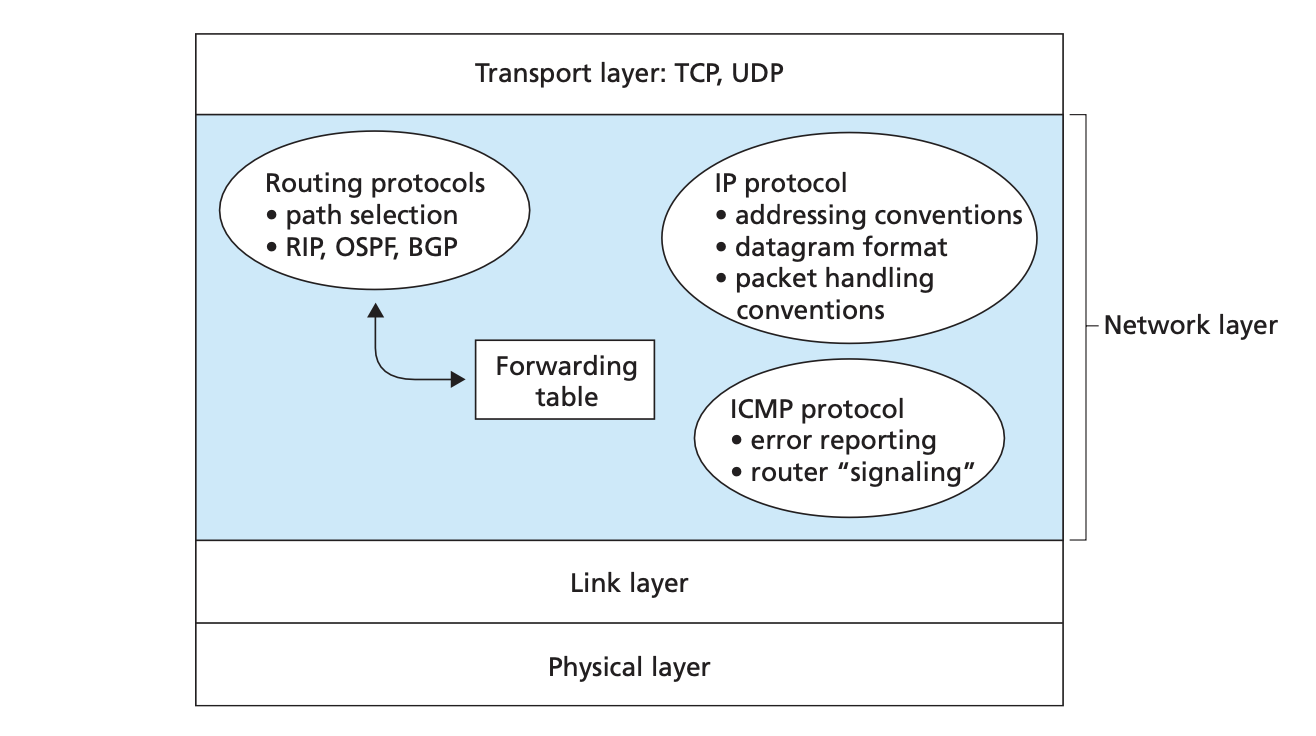
The Internet’s network layer has three major components.
- IP Protocol
- Routing Component
- Facility to report errors in datagrams and respond to requests of certain network layer information.
Datagram Format:
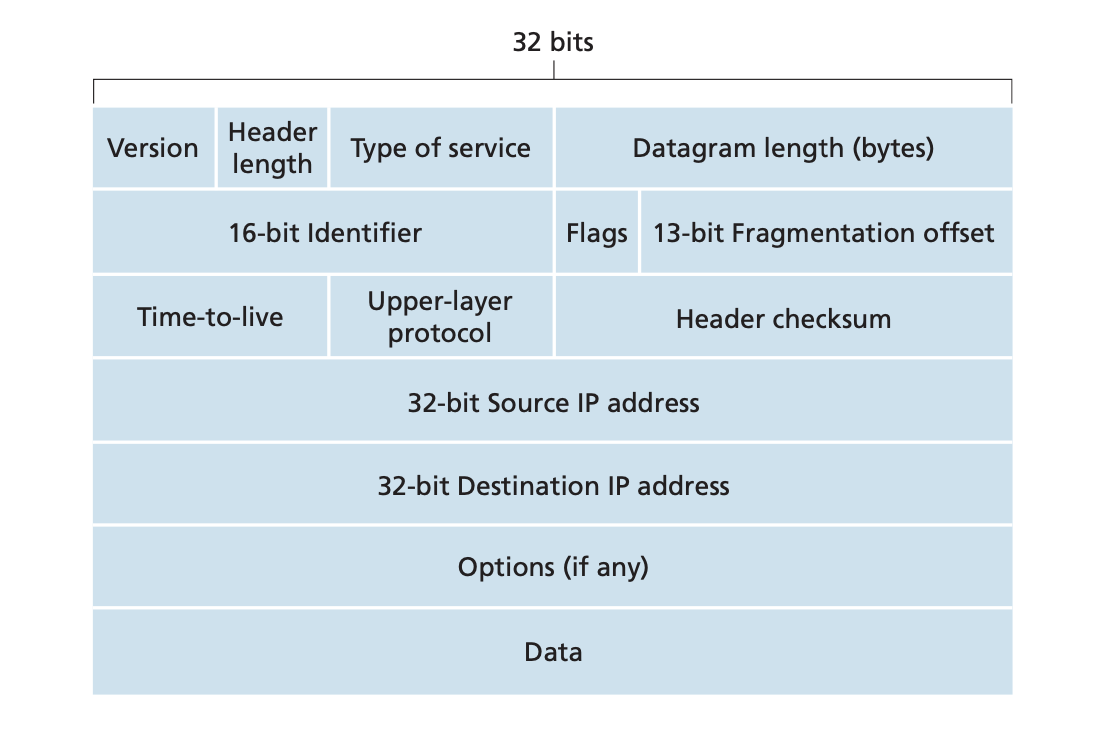
- specify the IP Protocol version
- Header length is variable due to
- allows different types of IP datagrams (requiring low delay, high throughput) to be distinguished from each other
- is the total length of the IP Datagram (). Imposes an upper bound to the datagram length ().
- These fields are related to IP Fragmentation.
- used to ensure that datagrams do not circulate forever in the network. The field is decremented by each router. If then drop then datagram.
- Value indicates the specific transport layer protocol the data should be passed
- Helps in detecting error bits in a received IP datagram Router computes the header checksum for each received IP dataframe and detects an error condition.
Drop the datagram for which error is detected
Checksum must be recomputed and stored again at each router, as field and may change
- Allows IP header to be extended
IP Fragmentation:
Not all Link Layer protocols can carry network layer packets of the same size.
The maximum amount of data that a link layer frame can carry is called the maximum transmission unit and places a hard limit on the length of an IP datagram.
Problem is that each of the links along the route between the source and destination can have different s
The solution is to fragment the data in the IP datagram, encapsulate each of these smaller IP datagrams in a separate link layer frame and send these frames over the outgoing link. Each of these smaller datagrams is referred to as .
Reassembling datagrams in the routers would introduce significant complication into the protocol and reduce router performance. designers thus decided to put the job of reassembling data on the end-systems.
To allow destination hosts to perform these reassembly tasks, the designers of IP put and fields in the IP datagram header.
When a IP datagram header is created it is stamped with a . When a router needs to fragment a datagram, each resulting datagram has the same of the original datagram.
This helps the destination host to recognise fragments of the bigger original datagram.
The is used to identify if there are any more fragments of the datagram. means that there are succeeding fragments. means that it is the last fragment of the datagram
The field is used for ordering the fragments
IPv4 Addressing:
An IP Address is a N-bit address
- The first bits represent the
- The remaining bits represent the in the network
Casting:
Ways to send the message is casting
:
:
:
From host to all other hosts of the its own network
The and part is set to ()
:
From host to all other hosts of some other network
: Done using Class D Addresses
Subnetting:
The process of diving the network into subnetworks
For dividing the network, bits are borrowed from the part
If we want to divide the network into subnets then will be borrowed. If we want to divide the network into subnets then will be borrowed.
Ex: Consider a Address For dividing the network into subnets
Subnet Mask: Mask is used to generate the from an IP Address. For the above example the will be
To get the from the we do
Subnets can be formed inside a subnet leading to Variable Subnetting
In this case the will have more bits
CIDR - Classless Inter Domain Routing:
Improved IP Addressing System. makes IP Allocation more effecient.
is regular dotted decimal representation; is network prefix and represents the in .
Ex: for the IP Address , the first are for and remaining are for .
Rules For a Block:
- All should be contigous
- Block Size should be a integral power of 2
- First should be divisible by the size of the block. So for a block size the first IP address should have least significant bits 0.
Supernetting:
Supernetting is the process of combining smaller networks into a single super network
Rules for Aggregation:
- Networks to be combined should be contiguous
- Block Size of each Network should be of the same size
- First should be divisible by the total size of the super net
DHCP - Dynamic Host Configuration Protocol
allows a host to obtain an IP address automatically. It can be configured such that a host receives the same IP address each time it connects to the network, or a host may be assigned a temporary IP address that will be different each time the host connects to the network.
also allows a host to learn additional information, such as the subnet mask, the address of the first-hop-router aka default gateway, and the address of its local server.
It is a client-server protocol. A client is typically a new arriving host waiting to obtain network configuration information.
The protocol is a four step process:
server discovery: The first task is to find a server. Done using , broadcasted () by the client.
server offer(s): A server receiving a discover message responds to the client with a , which is also broadcasted on the subnet. Each server offer message contains:
- of the received discover message
- - Amount of time for which the address is valid.
Request: The client will choose form among one or more server offers and respond to its selected offer with a , echoing back the configuration parameters
: The server responds to the with a , confirming the requested parameters.
NAT - Network Address Translation:
Private Addressing:
If we want to design a network for an institution such that messages can flow within the network but not outside, in such cases we use Private Addressing
Private IP Address Range:
- to
- to
- to
Private addresses only have meaning within a given network, how is addressing handled when packets are sent to or received from the global internet? The answer lies in .
router behaves to the outside world as a single device with a single . In essence, the router is hiding the details of the network from the outside world.
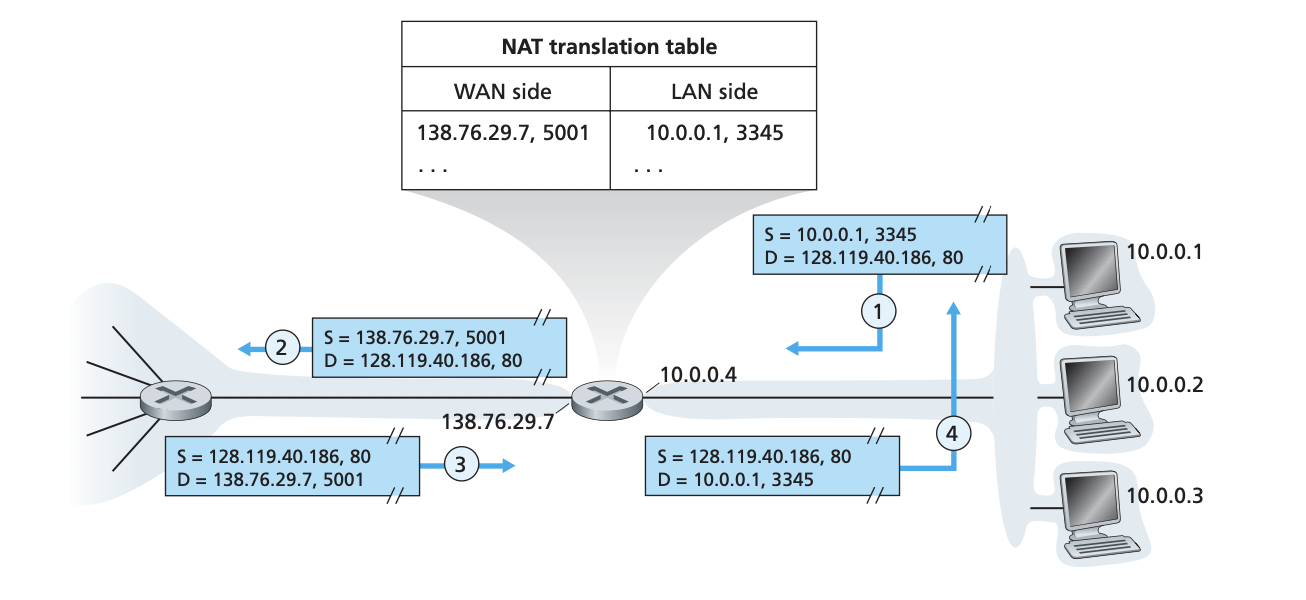
router maintains a .
Suppose a host () makes a requests a WebPage on WebServer () with IP Address
The host chooses a random port, suppose , and sends the datagram into the LAN.
The router receives the datagram, generates a new say , replaces the and the source IP address with its WAN-side IP address .
also adds an entry in its translation table.
When the response datagram arrives, router uses the and to index the translation table to obtain the appropriate and destination .
ICMP - Internet Control Message Protocol:
is used by hosts and routers to communicate network-layer information to each other. The most typical use of is for error reporting.
is often considered part of the but architecturally lies above , as messages are carried inside datagrams
messages have a and a field, and contain the and the first of the datagram for which the message is being sent.
PING Program:
- source host sends an ECHO Request message to the destination host
- destination host responds with ECHO REPLY message to the source host.
traceroute Program:
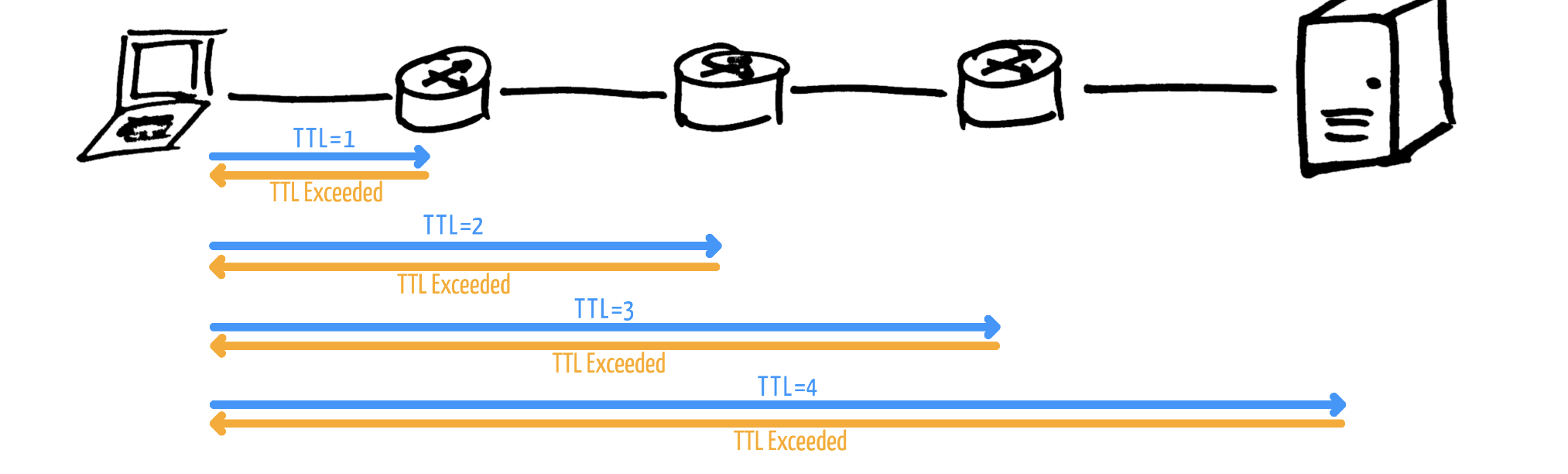
Used to determine the name and the addresses of the routers between source and destination hosts
Implemented using messages.
- Source sends series of ordinary datagrams to destination with increasing order of the field.
- When the datagram arrives at the router, , thus the datagram has to be discarded and a message is send back to the source with network information.
Thus information is incrementally collected about each router
IPv6
A prime motivation for this effort was the realisation that the IP address space was beginning to be used up. The designers of took this oppotunity to tweak and augment other aspects of the .
The most important changes introduced in are evident in the datagram format:
Expanded Addressing Capabilities:
address size is . This ensures that the world won’t run out of addresses.
In addition to the unicast and multicast addresses, has introduced anycast address, which allows a datagram to be delivered to any one of a group of hosts.
Streamlined header:
The fixed length header allows for faster processing of the datagram.
Flow labeling and priority:
has an elusive definition of a flow and states that this allows labelling of packets for which sender request special handling requirements.
It is possible that the traffic carried by a high-priority user (premium subscriber) might also be treated as a flow.
Datagram Format:
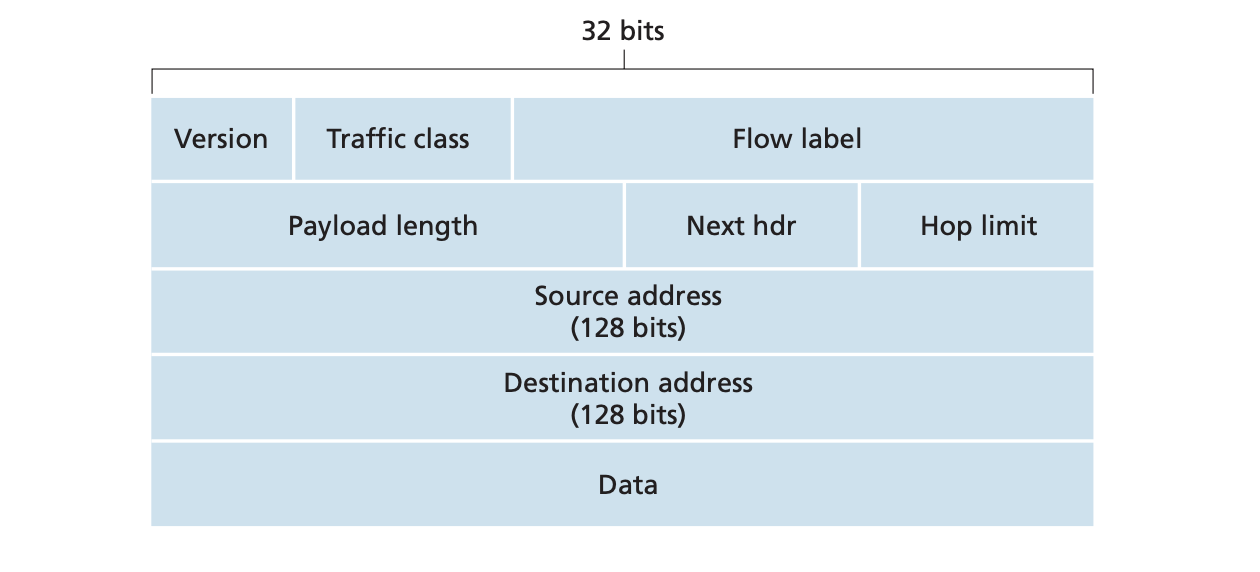
- : field identifies the version.
- : field is similar in spirit to the
- : field is used to identify the flow of the datagram
- : value is treated as unsigned integer giving the number of bytes in the datagram following the fixed header.
- : field is similar in spirit to the field
- : Similar to field
- : various formats of address
Fragmentation and Reassembly:
does not allow for fragmentation and reassembly. If an datagram received by a router is too large to be forwarded, the router simply drops the datagram and sends a error message.
Header Checksum:
Because transport layer and link layer protocols in the internet layers perform checksumming, the designers of felt this was redundant.
Transitioning from IPv4 to IPv6:
systems can be made backward compatible, so they can send, route and receive datagrams however, already deployed systems are not capable of handling datagrams.
Probably the most straightforward way to introduce capable nodes is a dual-stack approach where, nodes also have a complete implementation. Such a node can operate on both datagrams.
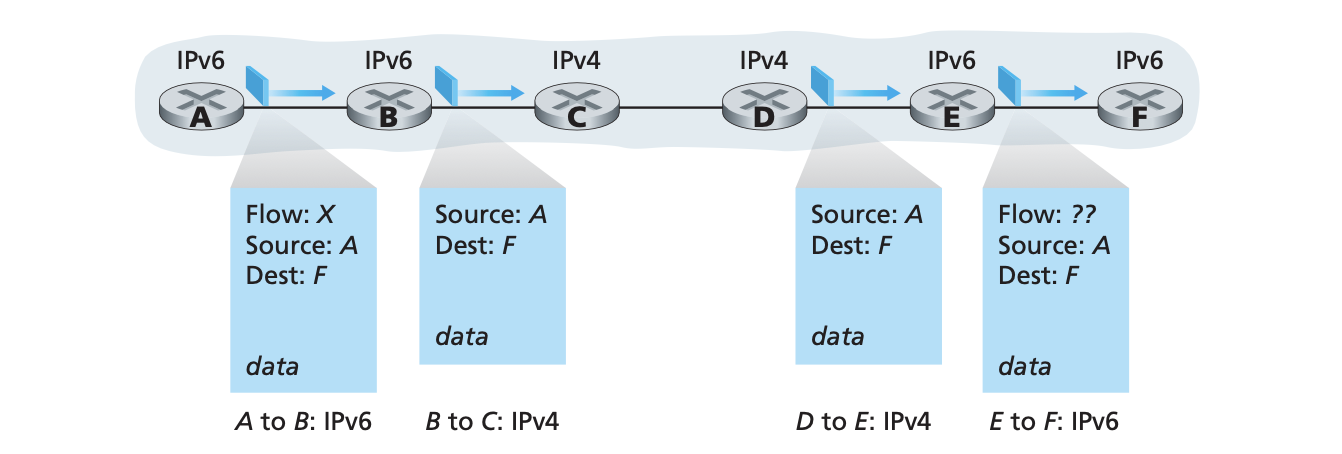
While using dual-stack approach, it is possible that two -capable nodes would have to communicate using . This happens when the two nodes are intervened by nodes.
An alternative to the dual-stack approach is called tunnelling. We refer to the intervening set of nodes between two routers as a tunnel.
Tunnelling works as follows:
- The sending node takes the entire and puts it in the data field of the datagram.
- The node on the receiving side of the tunnel extracts the datagram and then routes it if it had received the datagram from a directly connected neighbour.